
Abhishek Panda
May 31, 2017
9 min read
Emailing is relaxing (when designed to be relaxing).
It’s obvious that people spend a lot of time emailing. Email consumes a significant chunk of time in our lives (assuming that a vast majority of people spend more than half their time at work engaged with emails). Ironically though, email apps are considered to be an emotionless-transactional-productivity tool. The more it does, the better it is, they said. The less emotionally engaging it is, the more productive it is, they said. Apparently this seems to be the irrefutable litmus test for extreme efficiency and productivity. The mantra so to speak. It is somehow assumed that every email user needs an army of features to manage their emails, with all thrown into one fever inducing dashboard.

No one really tries to make email friendly to the users who spend a whole lot of time emailing, but don’t even need half these features. These redundant features act as nothing but a cluttered scrapyard to them. In all practicality, it actually is counter-productive, creating hurdles where there need be none. The extra clutter and feature overload actually results in people doing more to achieve less. Further, they get distracted (Read: lost) in the labyrinth of features, interface elements and not to mention the emails themselves.
The extra clutter and feature overload actually results in people doing more to achieve less.
It’s funny that to solve this clutter problem, more and more “smarter” features are added, such as ones deciding what emails are important to show and pushing the rest into obscurity. This only makes people live in constant fear of losing their emails or missing out on something important. Why create an abominable stress monster for the user?! Not all is bad though. There was of course an exception — Mailbox. When they tried to picture their Inbox as a to-do-list and use swipes to manage actions, they actually gave more power to the user.
Emailing for the most part is about scanning, reading and writing. Oddly and surprisingly enough, there is little to no emphasis on improving these basic experiences. With all our advancements in Science & Technology and Design, it is hard to imagine how no remarkable attempt has been made in improving these basic experiences. Let alone pushing them to the next level.
Emailing for the most part is about scanning, reading and writing. Oddly and surprisingly enough, there is little to no emphasis on improving these basic experiences.
So, at Newton, we basically stepped all the way back to see such ‘real problems’ in the bigger picture. From back there, it seemed obvious that the basic experiences needed strengthening before stacking them up with dazzling features. So, we went ahead and made emailing clutter free, and squarely focussed on lightning fast performance with great reading and writing experiences. Everything else simply worked as expected with features appearing only when required. By being simple, intuitive and familiar to use, it didn’t force you to learn a new workflow. It didn’t pretend to be smarter, or dictate what’s important for you. Newton simply solved the email problem by making it a delight to use. It encouraged the user to focus, understand better, communicate better, and quickly get back to ‘life’. A simple, meaningful yet profound role to play in our opinion.
So, here are three things we did to achieve this:
1. Scan, read and write better
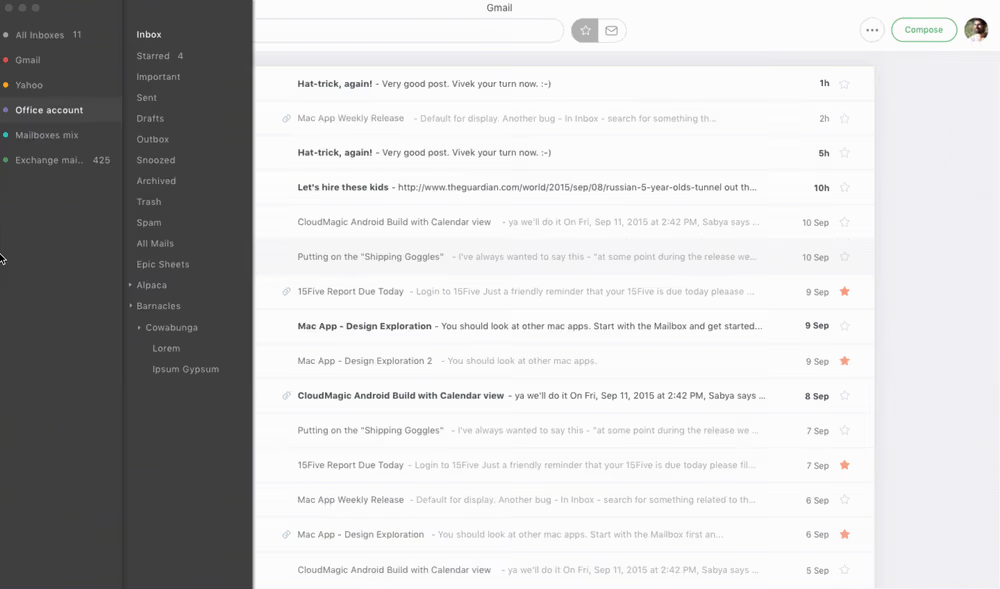
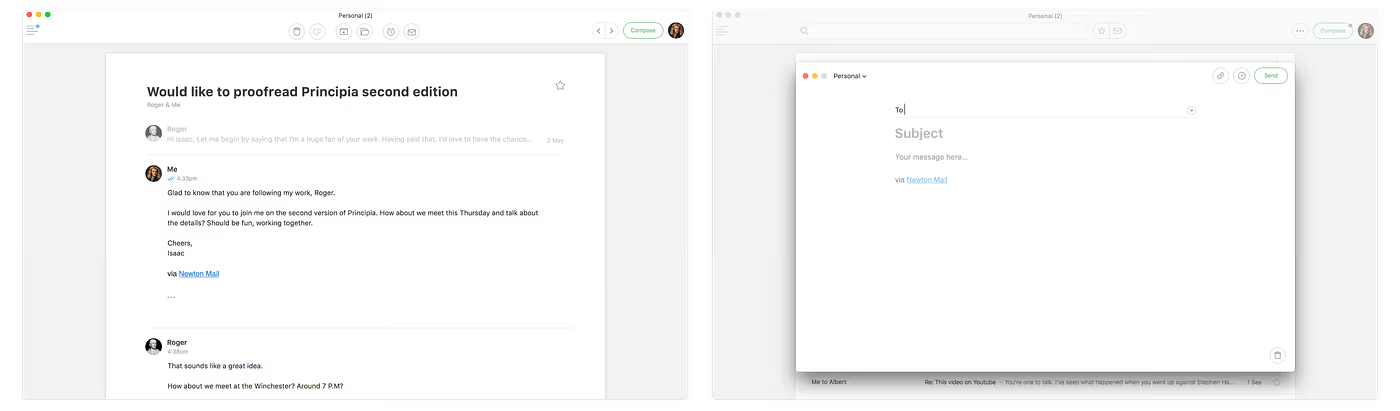
When we designed the inbox, we re-looked at everything that normally features on it. We stripped down everything, only keeping the elements that were absolutely necessary. On the Mac, we hid the nav-drawer and made it easily accessible only when required. We made the action buttons appear only when an email is selected. This gave utmost focus and clarity to the user. In addition to this, we are currently working on a feature that’ll let you further declutter the inbox by weeding out newsletters and social media updates (i.e. if you choose to set them as low-priority).
We wanted to bring a feeling of calm and focus to the experience of reading and writing by hiding everything other than the content (well, almost everything). We felt that for all practical purposes, everything else is simply a distraction. So, they only appear when required. Hence, it made the most sense to keep all such ‘extra’ elements contextual and dynamic. The extensive use of open spaces brought in breathing room, emphasis and consequently focus to what was important — your emails. We paid special attention to typography, obsessing over countless iterations of the font sizes and typefaces. Even the number of words per line were carefully chosen keeping reading behavior and cognitive strain in mind (no pun intended).
Our inspiration was in the simple assumption that the best reading and writing experiences would naturally stimulate you to read and write. Pleasure-10, Stress-0 (Inserting subliminal stress-busters since 2015). A pristine white sheet on a neatly organised desk with just a few prized tools, leaves you with a brimming sense of freedom and creativity. Newton offers you just that (metaphorically) and pushes you to follow a minimalist philosophy while composing. Once you see the beauty and efficiency of a minimal compose, no sense remains in having any kind of clutter at all. Further, while composing an email, there is no real need to have multiple fonts and sizes. It’s inconsistent and ugly (as you can see, we have an opinion, a strong one). One can easily stress on or distinguish things apart with the simple use of bold or italics. So, we left text formatting with just that and a bonus option to change colours.
Our inspiration was in the simple assumption that the best reading and writing experiences would naturally stimulate you to read and write.
2. Get round and about like the breeze
Normally, software applications are designed to be used primarily by mouse, additionally supporting keyboard shortcuts for advanced users. Interactions and navigations on the Newton Mac app are designed to strike a balance between mouse and keyboard inputs. Based on what is easier at a given point of time, the app nudges the user to use the right input mechanism (both mechanisms in some cases). It may sound like way too many input options to get familiar to. However, as there aren’t as many elements on a single screen to begin with, there isn’t much to learn.
- Simple one way navigations — go in, do your work, get out without needing to know the way you got in from. Wherever you are, or whichever state you are in, simply hitting ‘Esc’ (multiple times when you dive deep) ejects you out to the original state you started off from. Alternately, with the mouse, you can click anywhere on the screen’s grey background to do the same. No Point & Shoot, no sweat.
- Intuitive shortcuts — Like the ‘Esc’ example above, keyboard shortcuts for most actions and navigations are simple to learn and remember. Right and left arrow keys let you move between emails, hit delete to delete an email, Cmd+A to select all emails, Cmd+F to search, Cmd+1/2/3 to jump between accounts, just to name a few. Nothing fancy there, because it’s just purely designed to optimize functional efficiency. The only ‘fancy’ thing we tried, was to instantly scroll up to the top of the inbox list, by clicking on the header. This might not sound very obvious. But you will find it intuitive once you get used to the concept.
- Familiarity in interactions — Most interactions are based on how the MacOS works. It makes you feel at home, almost as if it were an extension on the Mac Finder window. For example, you can bulk select emails with Cmd+click, Shift+click, or even Cmd+A to select all emails.
- Quick one-key commands — Most of the actions like Archive, Star, Reply have one-key commands, making it fast to operate (inspired by Gmail). It works both in the inbox and when you’re reading emails.
3. Read Receipts & Sender Profile
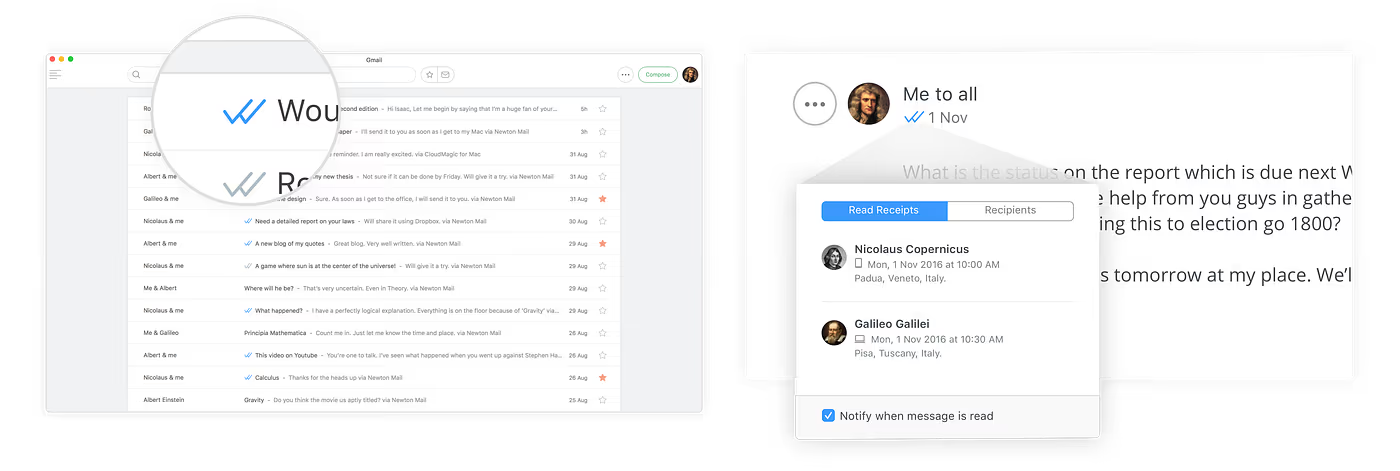
Read Receipts — This is Newton’s star feature. But then again, it doesn’t stand out and come in the way of the core reading and writing experience. It works using the same technology as all other “email tracking services”. However, it’s designed like a default feature that seamlessly works without you having to “track your emails” (like any other modern chat application like FB Messenger, iMessenger or WhatsApp). When you send an email and when it’s read the double ticks turns blue. It’s simple and subtle yet very effective. For the curious, more details appear on clicking the double ticks.
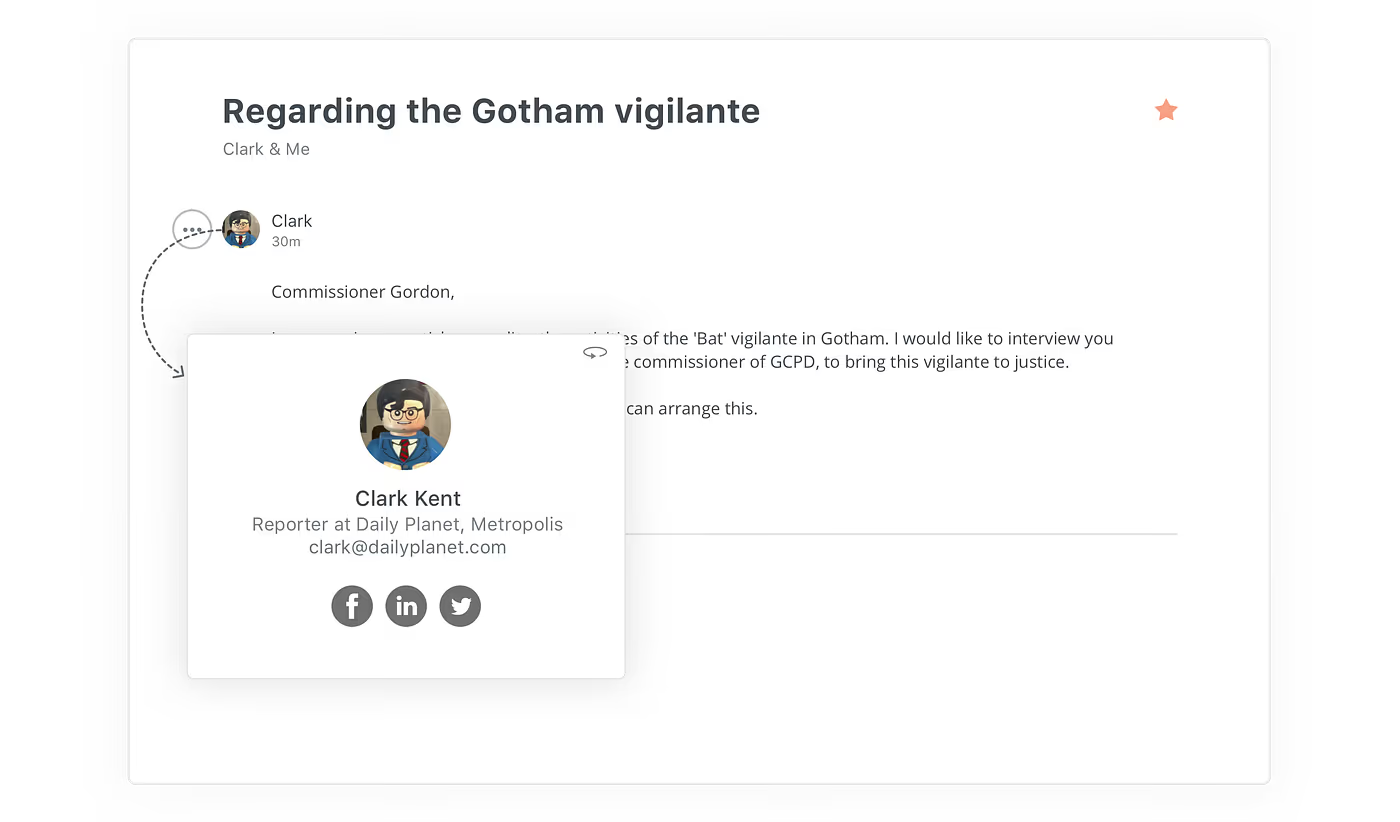
Sender Profile — Another premium feature that shows rich information about the sender of the email you received. Like everything else on Newton, this too is designed thoughtfully. In some other email apps, a panel on the right perpetually stares at you with the sender information. Sender Profile in Newton is designed to show up only for strangers as a heads-up tip, right below the email body. The sender information can also be accessed anytime by clicking on the sender’s display picture (like any modern social media or chat application), but never clutters up the space.
A good email app is a matter of opinion
There is a reason we smirk when we get such feedback: “I like Newton BUT still need that theme customization, that nav-drawer pinned, a multi-pane inbox, multiple fonts and sizes in compose (basically everything Outlook)”. Customization is for apps without an opinion. Fortunately for our users, Newton is opinionated. You see, a match in opinion is a match in intention. You’ll like Newton simply because of how it’s designed to make you feel. Of course, only if you resonate with how that feels. If you could drop your set workflow and give the Newton workflow an opportunity, it could inspire you, it could surprise you. With an open mind and over a little time you’ll quickly see what we are trying to do here. ;)
Think about how many hours you spend every day on emailing. I’m a graphic designer, and yet email is still my most used app. Communication matters. Relationships matter. Words matter. And Newton respects that. It’s beautiful. It’s elegant. It’s the way that I want to interact with the world. They’ve thought through a better way of doing email. It’s more elegant. Every day I use it makes me a little happier. Want to be happier? More Elegant? A better writer? You should try it out. You’ll like it. A little context — before this, I tried Mail.app, Gmail on the web, Mailbox and more. But I’ve never been as happy as I am with Newton. It’s worth the money. You’ll see.
- PointyHeadFred on Mac App Store





