Newton
September 9, 2021
3 min
read
We are super happy to release a major milestone for Newton Mail. We have been working hard through second Covid wave and many other challenges to release something we are very proud of. We are super thankful for the work team has done and appreciate everyone’s contribution.

Minimal UI with Ease of Use
We are completely revamping and redesigning our desktop apps. They are optimized for performance and speed. We are fixing the release mode of our desktop apps and now all apps can be released across platforms through App stores, including M1 apps.
This new redesign stays true to Newton design philosophy of being minimal while addressing major requests users had about accessing folders.
Now, users can pin folders at the top and access their favorite labels/folders with one click or a quick keyboard shortcut.
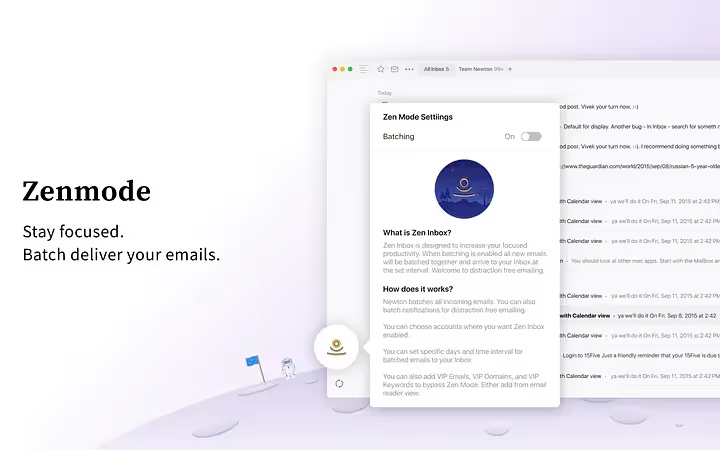
Zenbox for Calmer, Focused emailing
The average person checks their email 15 times a day, equivalent to every 37 minutes, and this habit has become a procrastination tool disguised as productivity, costing us one hour and 21 minutes every day.
Managing emails for pro means working through emails and getting things done. Zenbox helps you take back your time by delivering emails at set intervals.
Instead of continuously checking for new email and alerting the user for each, Newton will only check for new emails at preset times and alert you then.
- Zenbox batches your emails and notifications and delivers them at set interval.
- You can choose different intervals as well as days you’d like email delivered.
- You can also batch notifications instead of getting hit with many at the set interval.

Use Zenbox to Screen Your Emails Like You’d Screen Calls
You can also use longer interval times (or never) to screen emails before they hit your Inbox or you get notifications.
Mark emails, domains, or keywords as VIPs and get those important emails delivered directly to your Inbox.
This way you only focus on things that are important to you.

You can also add emails or domains to VIP or add them to Newsletter/Social (Tidy Inbox) from new menu icon within the email screen now.

Unified Folders To Save You Time
Newton now supports Unified folders for Newsletter (TidyInbox), Social (TidyInbox), Draft, Snooze, Archive, Spam, Sent, and Trash. A lot of you have been requesting this and we are happy to say that after a lot of architectural changes we have it working great.
Unified Search For Faster Search
In order for search to be faster, we are now removing account selection flow after every search. This will result in faster search experience for all our users.
Rich Text Editor for Desktop Apps
Our desktop apps now support a rich text editor ,you can pin, while composing emails. This was one of the most requested feature and is coming to mobile apps soon.
Sunsetting Recap feature
From this release onwards we will not be able to support the Recap feature. From our data set, less than 5% of users use the feature and it ends up costing us around 20%. It’s a tough decision to take but will ultimately benefit Newton.
Plenty of bug fixes and performance improvements
Besides these, there are plenty of performance enhancements and bug fixes on these newer builds.
Hope you guys love using this version of Newton as much as we loved building it.