
Francesco D'Alessio
January 20, 2017
2 min read

Do you always have a Gmail tab open in Google Chrome?
While it is good to stay connected, did you ever consider the impact it has on your Mac battery? The awesomeness of Chrome comes at a price — It drains your Mac battery.
At Newton, we acknowledge that battery consumption is an important aspect of overall user experience. Thanks to our cloud architecture, Newton is easy on battery — on both mobile and Mac.
We pitted ourselves against Outlook and came to a conclusion that Newton is much more battery-friendly. We thought it’ll be interesting to see where we stand against Gmail on Google Chrome.
Here’s what we did
We started our experiment with a new MacBook Pro, charged it fully and installed Newton Email and Google Chrome. Logged in to Gmail on Chrome and Newton Mac app using the same account.
Over the next 8 hours, we measured ‘Energy Impact’ and ‘Average Energy Impact’ for a few important email-related processes viz. previewing emails, sending/receiving emails, performing actions like Read, Star, Delete, Move to folder, etc.
(For those who are not familiar with the Mac Activity Monitor terminologies, the ‘Energy Impact’ is a relative measure of the current energy consumption of the app while ‘Avg Energy Impact’ is the same, averaged out over a period of 8 hours.)
Results
Here is how the ‘Average Energy Impact’ numbers stack up, on an average (graph — 1):
Newton Email — 0.372
Gmail on Chrome — 9.456
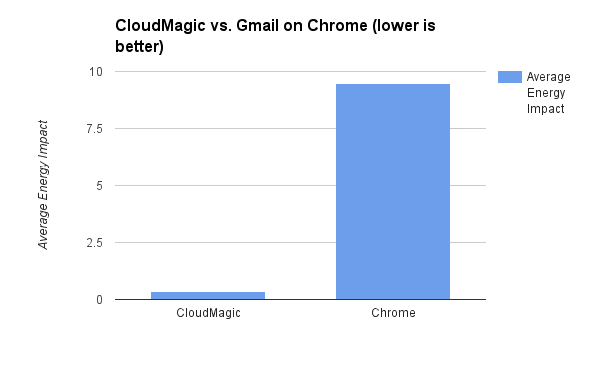
Over the period of 8 hours on a super busy Monday, here’s the Average Energy Impact of Gmail on Chrome and Newton.
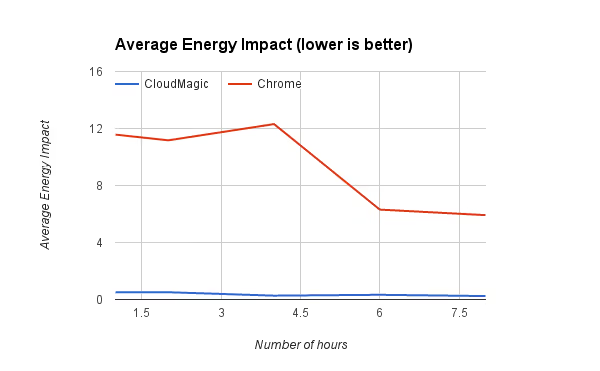
As the data suggests, Newton is far superior to Gmail on Chrome when it comes to power consumption. If you are serious about emailing and want your Mac to have a longer battery life, switching to Newton is a must.
If you’re looking for a modern, powerful emailing experience (that’s also easy on the battery), give Newton a spin.





