Umesh Gopinath
July 26, 2017
3 min read
When Gmail introduced Priority Inbox, years ago, I was excited. It would show me only the most important mails I should be reading based on my past interactions. It was going to make me more productive. Very soon I realised that I was missing out on a lot of mails which I was supposed to read and respond to. So I started marking them as important. But then I started living in constant fear of missing out on important emails which the system failed to recognize and also ended up doing more work in the process of marking mails as important. Soon I quit and moved back to Gmail’s default Inbox view.
Later over the years I have tried Smart/Focussed inbox of every other email app out there but all of them seemed to have the same problem. They all tend to blindly mark all mails I receive as part of a group as unimportant. Ditto with all machine generated email notifications. I had to always switch between two views to be on top of my inbox. One app even auto-selected mails and gave me a one swipe archive action which were actually important mails for me.
I think Gmail understood this problem and later introduced tabs in the default Inbox which allowed me to pick the categories of emails I didn't want in my primary view. This was good as I could set it to just move away promotional newsletters and social media (LinkedIn, Facebook) notifications from my personal account to have just my Uber/Amazon invoices, flight tickets and the occasional email I get from real people. For work emails, removing just the newsletters did the trick. The tabs later changed to category bundles in Inbox by Gmail which I could choose to show or hide in Inbox.
Tidy Inbox is not smart, and we are happy with that.
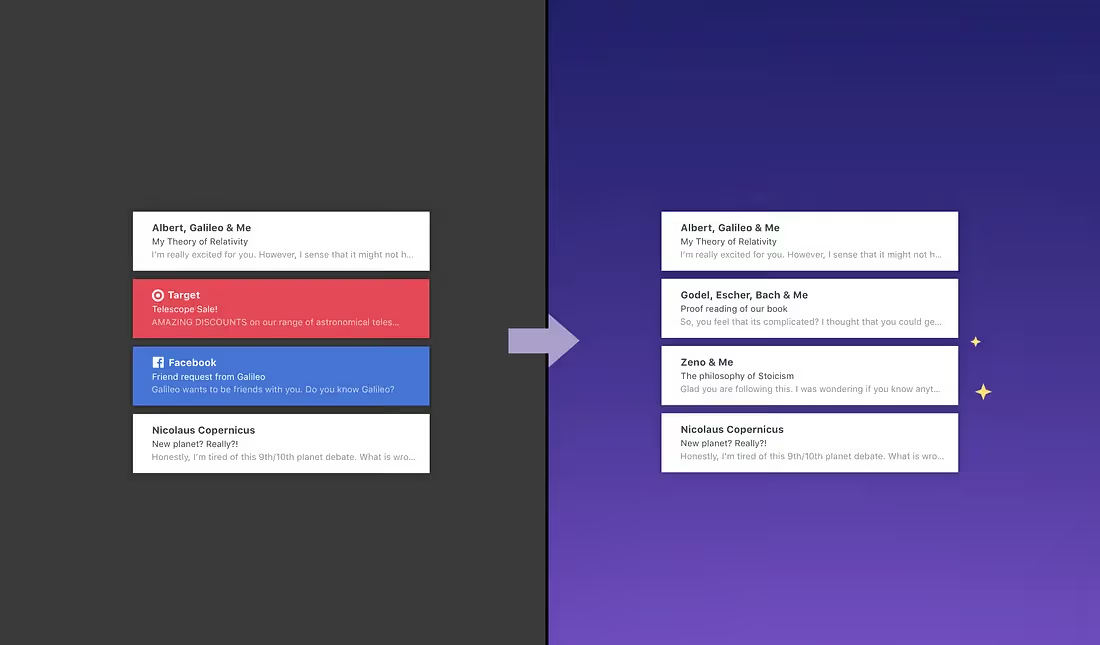
Tidy Inbox is Newton’s take on Gmail tabs, for all your accounts. It just allows you to pick the category of emails you would prefer to skip inbox (Newsletters and Social media emails to start with), so that you can focus on emails that actually matter. You will be left with a tidy inbox with emails from real people and machine generated emails that you are not supposed to miss, like invoices and flight tickets and also updates you have opted for. No other distractions. No more fear of missing emails. Live stress-free.
When enabled, these emails will skip inbox and go straight into the newly created Low Priority folder, which you can check once in a while. It will also help you in bulk unsubscribing from unwanted newsletters. If you see an email wrongly placed in Low Priority folders, just move it to Inbox (or vice versa), to train Newton to do the same with similar emails in the future.
So, if you have been missing Gmail tabs on Newton, turn on Tidy Inbox today. If you have been using SaneBox for your inbox, you can now safely turn it off. Tidy Inbox is all you need. It’s definitely a better experience as it’s baked-in natively to the Newton emailing experience. Head to Newton Settings > Superchargers > Tidy Inbox.
Newton is a beautiful email app supercharged with features like Read Receipts, Tidy Inbox, Send Later, Snooze & more for modern-day business communication. Available on Mac, Windows, Ios & Android.